Is Your cPanel or Webmail Logging You Out?
The major reason why your cPanel or webmail may log you out upon trying to access it could be because you are accessing it using mobile internet. Mobile internet uses dynamic IP addresses which changes almost every time and cPanel sees that as a security threat.
So what you need is a static IP address that does not change while trying to access your cPanel or webmail.
Please follow these simple steps to enable you gain access into your cPanel or webmail;
For you not to experience continuous logout, you can either connect to the internet via router or use VPN with your mobile internet for you to have static IP address.
There are some free browser extension VPNs that you can use if you don't have paid VPN access.
To use free VPN to access your cPanel or webmail;
- Go to your google search and type VeePN for chrome extension
- Click on Get Extension
- Click on Add to Chrome
- Click on Add extension from the pop up button
- Choose the free plan from the payment plan page that comes up next
- Then at the top right hand on your browser, look for the Extension icon, click on it and then click on the Free VPN
- Next is to click on continue and the start buttons from the VeePN pop up box
- Then click the big white button at the center to put on the VPN.
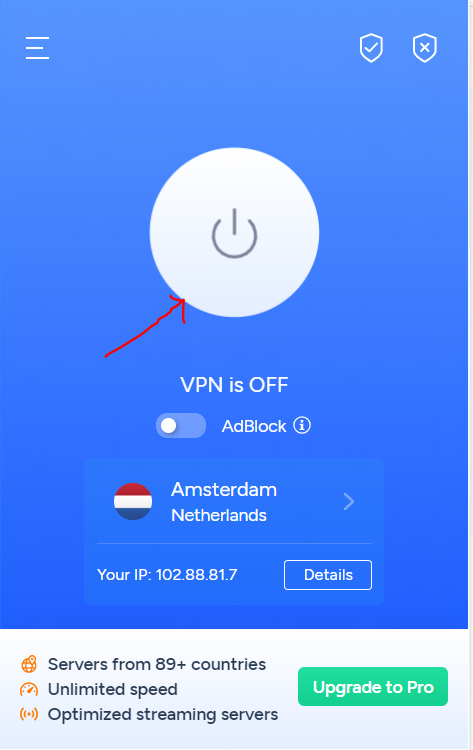
Make sure that the white button turns to green. Once this is done, then just go back to your login browser page for the cPanel or webmail and try logging in now, it should be successful.
If you still have any concern, please do not hesitate to contact our support via support ticket or via whatsapp on (+234)09139168118